
By Shradha
AI Search Experience Integration
Transforming Settings into an Intelligent Resolution Experience


Highlights :
AI Integration · Strategy · Architecture · Validation

Context & Problem
The Settings page was one of the most visited yet underperforming areas of the app. Users arrive with high intent: to fix an issue, update preferences, or resolve a concern quickly.
Data analysis revealed quantitative signals as :

Qualitative Signals as what users were saying:
-
"I can't find what I'm looking for."
-
"I don't know where this setting lives."
-
"Search is not taking me to the setting."
Business Impact:
-
Low self-service resolution (only 45% task completion)
-
High cognitive load in a high-stakes environment
-
Lower customer satisfaction scores
This Led to Deeper Research
To understand why users were failing to resolve their tasks, we conducted focused discovery -
-
Reviewed Settings navigation and search usage patterns
-
Analyzed repeated and failed search attempts
-
Ran short surveys after Settings interactions
-
Interviewed existing users about recent, real tasks
-
Observed usability walkthroughs for common Settings actions
-
Reviewed comparable patterns across enterprise and consumer platforms
(Note : The indepth research details are given in another 'Settings' project in the portfolio)
We combined quantitative signals (drop-offs, click-through rates, search behavior), qualitative inputs (surveys, interviews), Search attempt analysis and competitive benchmarking to understand where users were getting stuck - and why.

Analysis & Insights
Several system-level failures emerged with -
-
Static navigation
-
Keyword-based search
-
Deep, fragmented information architecture
What Users Were Struggling With -
-
Finding the right setting with Search
-
Users retried searches with different terms
-
Navigation required guessing and backtracking
-
Help content felt disconnected from the task
Why Search Became the Core Pain Point -
-
User thought in questions, but Search required exact keywords
-
Internal feature naming didn’t match user language
-
Users struggled to locate the right setting quickly
-
Relevant results were missed
KEY INSIGHT
Users knew what they wanted to do, but struggled to locate where or how to do it.
The burden of understanding the system was placed on the user.
Strategic reframing
Incrementing exiting Search , but were not enough : The Transformation Moment
We explored conventional improvements:
-
Better labeling and categorization
-
Reorganized Settings categories
-
Enhanced keyword matching and synonyms
-
Improved search results ranking
However, all of these still required users to:
-
Translate intent into system language
-
Navigate multiple layers
-
Understand product structure upfront
The core problem remained unchanged , but got reframed: Users had intent, but no easy way to express it.
INITIAL APPROACH : SEARCH ENHANCEMENT
REFRAMED QUESTION
“How do we improve search?”
to
"How might we allow users to explain what they want in their own ways and guide them to resolution -without increasing risk or complexity?"
This reframing positioned AI not as a replacement for structure, but as support for findability, confidence, and clarity.
And the transformation goal became -
Turn Settings into an intelligent resolution layer that understands user intent and accelerates outcomes—without compromising control or safety.
AI : Transformation Opportunities identified as :

Solution: Target AI Assist
Target AI Assist was designed as a guided, scaffolded AI interface embedded directly within Settings - supporting both discovery and execution.
AI here acts as :

User journey transformation:

Cross-team collaborations

Concept explorations :
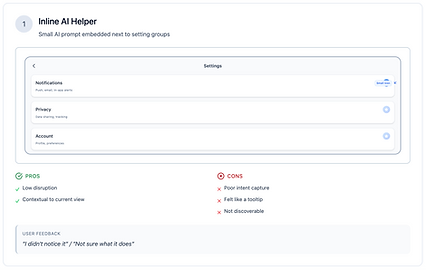


CONCEPT EVALUATION MATRIX LEARNING
Users preferred a focused, dedicated conversational space when resolving settings-related tasks.
The mental model of "entering an AI help mode" created clarity and trust.
Architecture with AI:

System architecture
Information architecture

Progressive Disclosure Principle -
Each screen reveals information appropriate to the user's decision-making stage - critical in enterprise environments where clarity reduces anxiety.
AI Scaffolding & Safety Guardrails
Because Settings contains sensitive actions (billing, privacy, account deletion), AI was deliberately bounded with enterprise-grade safety constraints.

Guardrails Applied -
-
AI responses restricted to verified system knowledge (no hallucinations)
-
No destructive actions without explicit confirmation step
-
Clear fallback paths for ambiguity ("I'm not sure. Here are related settings...")
-
Predictable, explainable response structure (no black box)
-
Human handoff for complex or sensitive edge cases
-
Audit logging for compliance and governance
This Ensured -
-
Reduced risk of errors or unintended actions
-
Stakeholder confidence across legal, compliance, and product teams
-
Compliance readiness for enterprise standards
-
Long-term scalability and maintainability
AI Limitation Communication -
When AI couldn't help, it clearly stated: "I can't assist with that directly, but I can connect you to [support/specific setting]."

DEFENCE IN DEPTH
Multiple validation layers ensure AI responses are trustworthy, transparent and never leave users stranded without manual options.
Experience Journey Mapping
The AI-powered resolution journey maps critical decision points where user agency and AI assistance intersect.

Experience Flow Design -
Each screen reveals information appropriate to the user's decision-making stage - critical in enterprise environments where clarity reduces anxiety.


Pilot Testing & Validation
Rather than a full rollout, a controlled pilot was conducted to validate assumptions and de-risk the launch.

What users said -

5 critical insights drove targeted iterations that transformed the AI experience from uncertain to trustworthy, delivering measurable improvements across engagement, trust, and task completion.


Live prototypes
App

Web

Impact


Strategic Impact & Transformation Leadership

Artifacts & Deliverables

Whats next

Key reflections
Target AI Assist demonstrates how AI,
when thoughtfully bounded and scaffolded, can transform a traditionally “dry” utility space into a high-value, resolution-centric experience.
From a design transformation perspective, this project:
-
Shifted the organization’s mental model from “designing pages and menus” to “designing for intents and outcomes.”
-
Established a reusable AI-UX integration pattern for other enterprise surfaces (e.g., Admin, Help, Billing).
-
Showcased that trust in AI is earned through clear boundaries, consistent explanations, and safe failure modes - not just capabilities.
As Product Design Transformation Specialist, my contribution was to:
-
Connect user pain, AI potential, and enterprise governance into a single, coherent strategy
-
Translate that strategy into concrete flows, guardrails, and UI patterns
-
Validate the approach through real-world metrics and feedback, building a foundation for broader AI-assisted experiences across the product.